
Cloud Security Best Practices for Businesses: 10 Ways to Protect Your Data
Cloud computing has become a core part of modern business infrastructure. According to industry estimates, global cloud spending continues to grow rapidly as organisations shift critical systems away from traditional on-premise infrastructure to host business systems, communication tools, and customer information. Businesses are increasingly moving their applications, files, and collaboration tools to the cloud because it offers greater flexibility, scalability, and the ability to work from anywhere.
Across Australia, cloud adoption has accelerated rapidly in recent years. Organisations of all sizes are using services such as Microsoft Azure, Amazon Web Services (AWS), and Google Cloud Platform to support remote work, scale operations, and reduce infrastructure costs. Cloud-based tools like Microsoft 365, CRM platforms, and SaaS applications have become part of everyday business operations.
However, as more systems move to the cloud, cybersecurity risks also increase. Misconfigured cloud services, weak user access controls, and insufficient monitoring can expose sensitive information or create entry points for cybercriminals. In many cases, cloud security incidents occur not because the cloud provider failed, but because security controls were not properly implemented by the organisation using the service.
Poor cloud security management can lead to:
- Data breaches involving customer or financial information
- Business disruption caused by ransomware or system compromise
- Regulatory compliance issues
- Loss of customer trust and reputational damage
For businesses that rely on cloud platforms to run daily operations, implementing strong cloud security practices is essential to protect systems, data, and long-term business continuity.
What Is Cloud Security?
Cloud security refers to the technologies, policies, and practices used to protect cloud-based systems, data, and applications from cyber threats.
Unlike traditional IT infrastructure, cloud platforms operate using a shared responsibility model.
This means:
- The cloud provider is responsible for securing the underlying infrastructure, such as physical data centres and network hardware.
- The business using the cloud is responsible for securing its data, user access, applications, and configurations.
For example, platforms such as Microsoft Azure, AWS, and Google Cloud provide built-in security tools and infrastructure protection. However, organisations must still configure their environments properly, manage user permissions, and monitor systems regularly for suspicious activity.
Without these controls, even a powerful cloud platform can become vulnerable to cyberattacks.
Key reasons cloud security matters include:
Protect Sensitive Business Data
Businesses store customer records, financial data, and internal documents in the cloud, making them attractive targets for attackers.
Solution: Encryption, strong access controls, and identity verification help ensure only authorised users can access sensitive information.
Did you know? Data breaches and credential theft remain among the most common cyber incidents reported to the Australian Cyber Security Centre.
Reduce the Risk of Cyber Attacks
Cloud accounts are often targeted through phishing, weak passwords, or stolen credentials.
Solution: Multi-factor authentication (MFA) and activity monitoring help prevent unauthorised access.
Fact: MFA can block the majority of automated credential-based attacks.
Support Compliance Requirements
Many Australian businesses must comply with strict data protection and cybersecurity regulations.
Solution: Security measures such as logging, encryption, and access management help organisations meet these requirements and protect customer data.
Maintain Business Continuity
Cyber incidents or system failures can disrupt operations and cause downtime.Solution: Cloud backups, disaster recovery planning, and monitoring help organisations restore systems quickly and minimise disruption.
Cloud Security Best Practices for Businesses
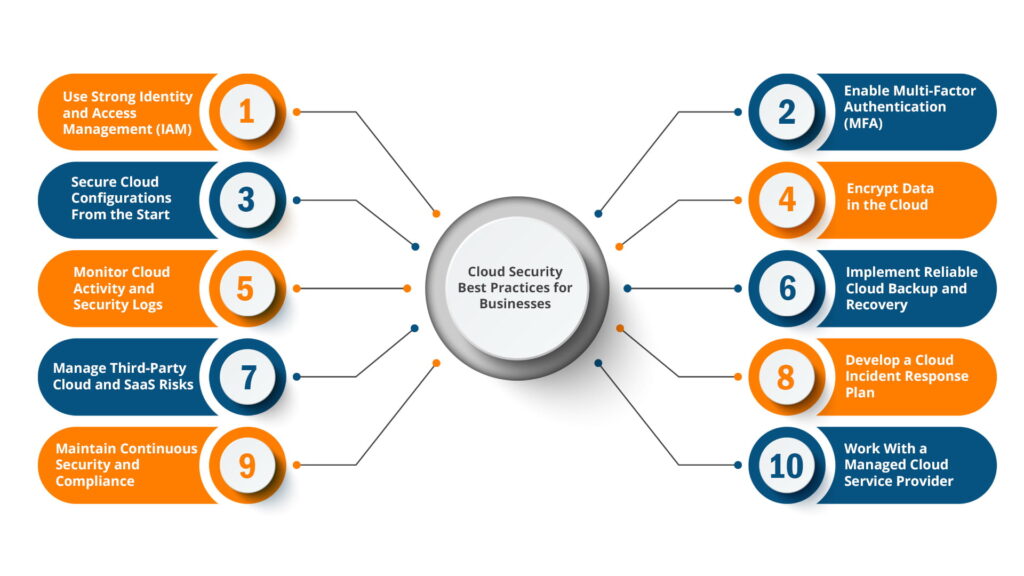
Implementing a structured cloud security approach helps businesses reduce vulnerabilities and operate safely in cloud environments. Below are some key best practices organisations should consider.
1. Use Strong Identity and Access Management (IAM)
In cloud environments, identity becomes the primary security perimeter. If an attacker gains access to user credentials, they may be able to access cloud resources from anywhere.
Identity and Access Management (IAM) helps organisations control who can access systems and what they are allowed to do.
What businesses should do:
- Apply the principle of least privilege, giving users only the access they need
- Regularly review permissions and remove unnecessary privileges.
- Disable unused or inactive accounts.
- Avoid shared login credentials, and ensure activity can be traced to individual users.
- Implement single sign-on (SSO) where possible to centralise identity management.
Strong identity management significantly reduces the likelihood of unauthorised access.
2. Enable Multi-Factor Authentication (MFA)
Passwords alone are no longer enough to protect cloud systems.
Multi-Factor Authentication (MFA) requires users to verify their identity using an additional factor, such as a mobile authentication app or security key.
Even if a password is stolen, attackers cannot access the system without the second verification step.
What businesses should do:
- Enable MFA for all users, especially administrators.
- Use authentication apps or security keys rather than SMS codes where possible.
- Apply conditional access policies that require MFA for high-risk login attempts.
Cybersecurity experts widely consider MFA one of the most effective controls against account compromise.
3. Secure Cloud Configurations From the Start
Many cloud security incidents occur due to misconfigured services. Default settings are often designed for convenience rather than security.
For example, storage systems may be accidentally left publicly accessible, or administrative access may be overly permissive.
What businesses should do:
- Follow recognised security benchmarks, such as CIS benchmarks, when configuring cloud services.
- Disable unnecessary public access to storage and databases
- Implement baseline security configurations for new deployments.
- Regularly audit cloud settings for potential vulnerabilities.
Proper configuration significantly reduces the risk of accidental data exposure.
4. Encrypt Data in the Cloud
Encryption protects data by making it unreadable to anyone without the correct encryption key. This is particularly important when storing sensitive business or customer information in the cloud.
- What businesses should do:
Enable encryption for data stored in cloud services. - Use secure encryption protocols for data transmitted over networks.
- Manage encryption keys carefully using cloud security tools.
- Consider additional encryption for highly sensitive information.
Encryption ensures that even if data is accessed by an unauthorised party, it cannot easily be used.
5. Monitor Cloud Activity and Security Logs
Visibility is critical for cloud security. Organisations need to know what activity is taking place within their cloud environment. Security monitoring helps detect unusual behaviour such as unauthorised logins or configuration changes.
- What businesses should do:
Enable activity logging across cloud services using tools such as Azure Monitor, AWS CloudTrail, or similar logging systems. - Monitor login attempts and system changes.
- Configure alerts for suspicious behaviour.
- Retain logs for security analysis and auditing.
Monitoring allows businesses to identify threats early and respond quickly.
6. Implement Reliable Cloud Backup and Recovery
Although cloud platforms are highly resilient, data loss can still occur due to ransomware, accidental deletion, or system failures. A proper backup strategy ensures organisations can recover important data quickly.
What businesses should do:
- Schedule automated backups of important systems.
- Store backup copies in separate locations or regions.
- Test backup restoration regularly.
- Use versioning to protect against accidental changes.
Regular backups are essential for maintaining business continuity.
7. Manage Third-Party Cloud and SaaS Risks
Most businesses use multiple cloud services and SaaS applications. Each of these services can introduce additional security risks if not managed carefully.
What businesses should do:
- Maintain an inventory of all cloud applications used within the organisation.
- Review the security practices of third-party providers.
- Limit the data shared with external applications.
- Remove access when services are no longer required.
Managing third-party risks helps prevent security gaps across the cloud ecosystem.
8. Develop a Cloud Incident Response Plan
Even with strong security controls, incidents can still occur. Having a clear response plan helps businesses react quickly and minimise damage.
What businesses should do:
- Define roles and responsibilities for responding to incidents.
- Document procedures for investigating cloud security events.
- Test response plans through regular exercises.
- Maintain communication channels with cloud providers and IT partners.
- Preparation ensures faster and more effective incident response.
9. Maintain Continuous Security and Compliance
Cloud environments change frequently as new services, users, and configurations are added.
Security and compliance must therefore be continuously monitored rather than reviewed occasionally.
What businesses should do:
- Conduct regular security assessments.
- Review compliance requirements relevant to the business.
- Use automated security tools to identify configuration issues.
- Assign ownership for security responsibilities.
Continuous oversight ensures the cloud environment remains secure over time.
10. Work With a Managed Cloud Service Provider
For many businesses, managing cloud security internally can be challenging due to limited IT resources or specialised expertise.
A managed cloud service provider can help organisations implement and maintain strong security controls across their cloud infrastructure.
What businesses should do:
- Partner with experienced cloud specialists
- Implement proactive monitoring and threat detection.
- Ensure backups, updates, and configurations are properly managed.
- Align cloud systems with cybersecurity best practices.
Working with cloud experts helps businesses operate securely while focusing on their core operations.
Strengthening Your Cloud Security Strategy

With enormous benefits for businesses, including flexibility, scalability, and cost efficiency, Cloud technology continues to reshape how organisations operate, collaborate, and scale their services. However, without the right security practices, cloud systems can become vulnerable to cyber threats.
By implementing strong identity management, enabling multi-factor authentication, maintaining reliable backups, monitoring cloud environments, and working with experienced cloud specialists, businesses can significantly reduce their security risks.
For organisations using platforms like Microsoft 365 or Google Workspace, understanding how these services fit into your cloud strategy is also important. You can explore this further in our guide on Microsoft 365 vs Google Workspace: which cloud and SaaS solution is right for your business? to learn how different cloud solutions support modern business operations.
Frequently Asked Questions About Cloud Security
What is cloud security?
Cloud security refers to the policies, technologies, and controls used to protect cloud-based systems, applications, and data from cyber threats, unauthorised access, and data breaches.
Why is cloud security important for businesses?
Cloud security helps businesses protect sensitive data, reduce the risk of cyberattacks, maintain compliance with data protection regulations, and ensure systems remain available and reliable.
What are the most common cloud security risks?
Common cloud security risks include weak passwords, stolen credentials, misconfigured cloud services, a lack of monitoring, and unpatched vulnerabilities that attackers can exploit.
Is the cloud more secure than on-premise infrastructure?
Cloud platforms can be highly secure when configured correctly. Major providers like Microsoft Azure, AWS, and Google Cloud invest heavily in infrastructure security, but businesses are still responsible for managing access, data protection, and configurations.
What is the shared responsibility model in cloud security?
The shared responsibility model means cloud providers secure the underlying infrastructure, while businesses are responsible for protecting their data, managing user access, and configuring security settings.
Not Sure If Your Cloud Environment Is Secure?
Many businesses move to the cloud quickly but overlook critical security configurations along the way, which is why businesses find that working with experienced cloud specialists helps ensure security controls are properly configured and continuously monitored. Issues such as excessive user permissions, missing MFA, or weak backup strategies can leave systems exposed without anyone realising.
Nxt IT helps businesses review their cloud environments, identify vulnerabilities, and implement practical security improvements that reduce risk.